

DISM and Microsoft Updates
April 13, 2025
PowerShell | To Affinity and Beyond!
April 16, 2025DISM and Microsoft Updates
April 13, 2025PowerShell | To Affinity and Beyond!
April 16, 2025
MAXDOP
SQL - "Max Degree of Parallelism"
In this article, I'm going to talk about a SQL setting that both the DBA and the System Architect should be aware of when designing a specific SQL server Application to ensure your getting the most out of your database and hardware performance.
Microsoft already has a great article here talking about this in detail, but what I want to show you is how this applies to the planning from the "build up" or existing config.
What we have to do first is to understand what a NUMA node is. In windows we already have Physical core counts, Logical core counts, so what is a NUMA Node?.
Simply put, it's a logical representation of the collection of physical cores in a single processor.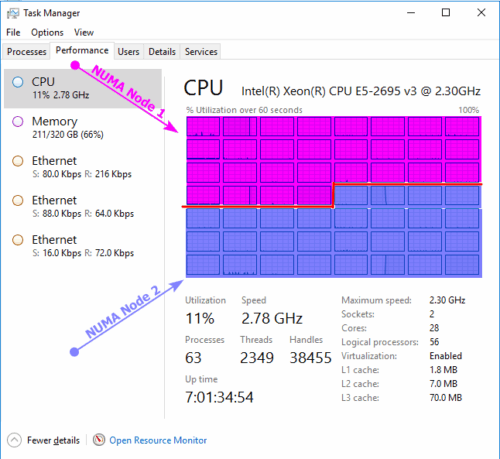
Technical Explanation is:
"Non-Uniform Memory Access (NUMA) is a computer system architecture that is used with multiprocessor designs in which some regions of memory have greater access latencies. This is due to how the system memory and processors are interconnected. Some memory regions are connected directly to one or more processors, with all processors connected to each other through various types of interconnection fabric. For large multiprocessor systems, this arrangement results in less contention for memory and increased system performance."
Essentially from the "old school" reference "Proc 0" , "Proc 1" Is now called NUMA-0 and NUMA-1 in the newer server world and applies to VM's as well.
This is key to understanding the role in the significance as to how this plays with the MAXDOP value.
Within task manager, you can change your CPU view to see the NUMA node representation
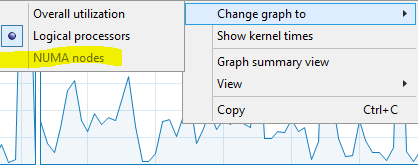
Here you can see the performance for each NUMA "Socket" vs the cores.
Here the memory installed next to each Processor in the hardware.
Each Grouping is a NUMA node in the OS.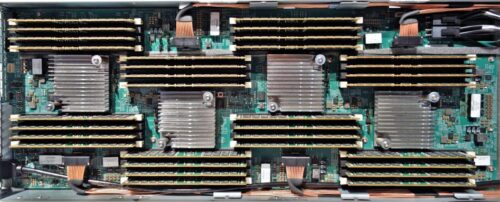
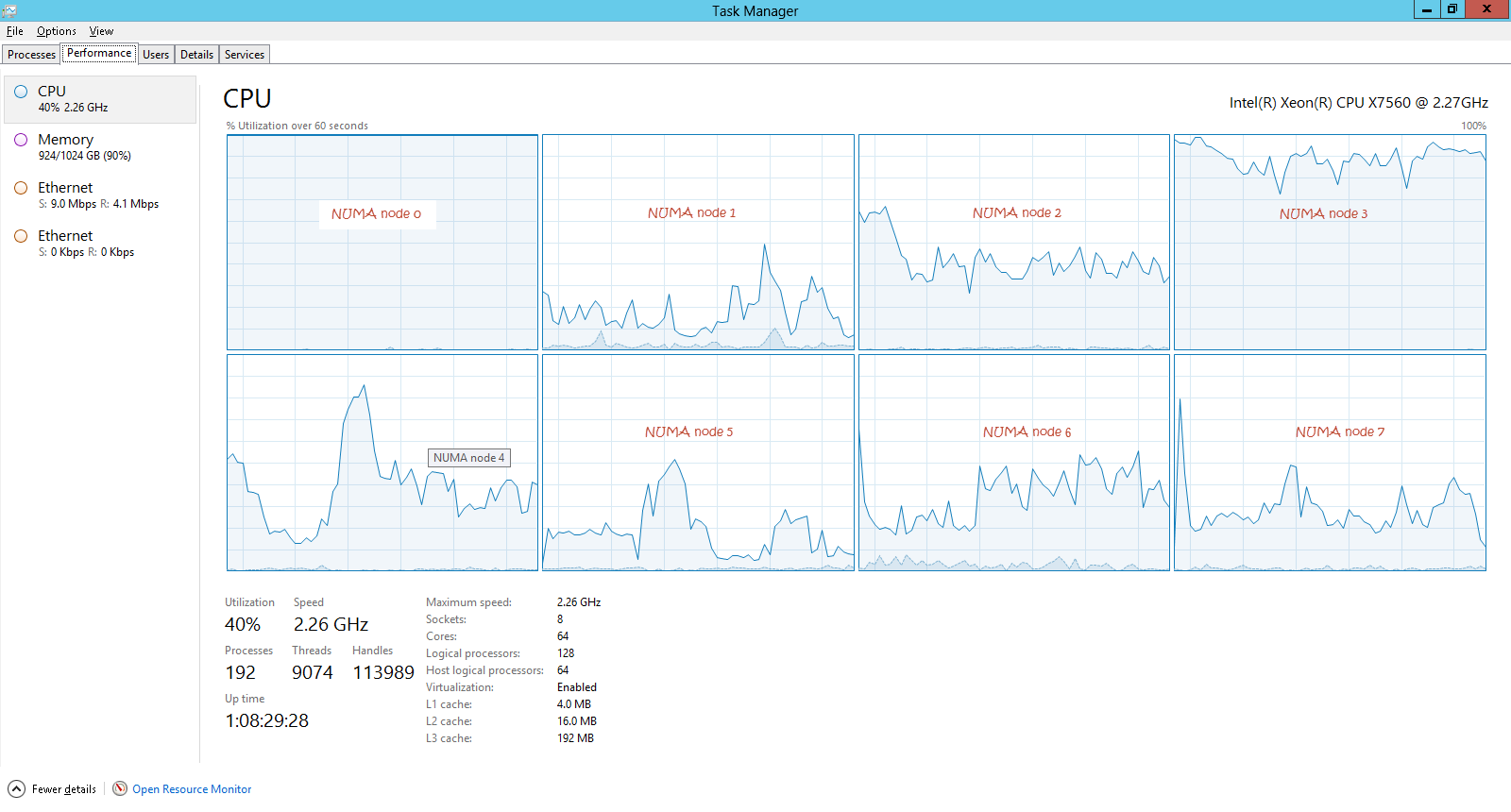
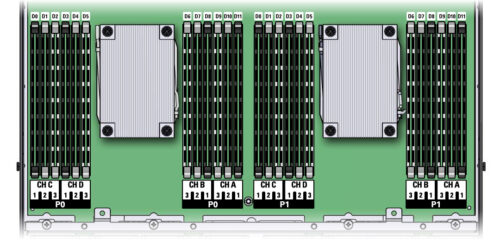
The Logical/Physical layout within the server looks like the diagram above.
You will see Memory DIMMS installed next to their respective Processor Sockets
Between them is what's called a QPI Bridge.
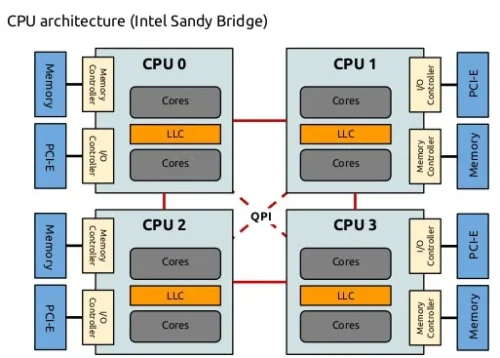
Anytime the task uses more cores than is contained in a NUMA node? or uses more memory than a single processor has "next" to it.
Will cause it to cross the QPI bridge for additional memory or cores incurring a small latency in the overall process.
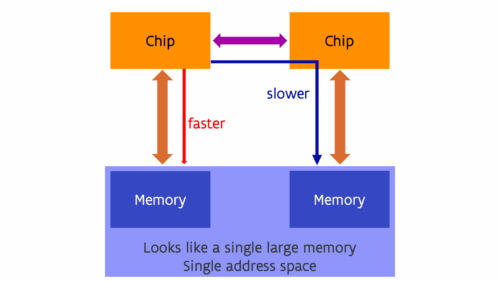
Most Database Admins don't care about this or may not be aware of this activity at all.
But when your given the task to plan out a SQL cluster/HAG with the expectations of high speed transactional processing, This MAXDOP value begins to affect you greatly.
Lets say we have 8 Gig sticks in a 2 Processor 4 core ea server like above resulting in a total reporting of 8 cores and 64 Gigs of memory.
Scenario 1
If you have your primary SQL job/task that using 8 cores but only needs 24G of memory?
You might want to lower your MAXDOP to 4, This will help keep the SQL task contained to just one Processor and access it's local memory avoiding the latency penalties when crossing the bridge.
Remember, MAXDOP won't keep SQL from using all the cores, This simply helps SQL manage the threading to optimize "where" the data flows on hardware.
Using the same Scenario 1 above but you want to keep the core count?
Then upgrade the processor to a higher count will give you a boost in performance because it won't cross the bridge for additional cores.
Scenario 2
Your task is only using 2 cores but utilizes 48G of memory "like an index operation for example?"
in our test example we only have 32G installed per processor, so 48G is causing the SQL task to crossover for the additional memory.
In this case you would be better off either filling in the empty channels with additional memory or swapping out the memory for higher density DIMMs if there are no open slots.
Memory is a bit of a "dance" when it comes to performance.
- More sticks = more overall "memory bandwidth" available to the processor .
- Higher Density = more memory accessible to the processor without crossing the bridge.
Your budget and findings will help you figure out the best scenario in your case.
In SQL, DISK IO and CPU saturation is only a small part of the overall performance.
You may find that if you have many small transactions that are under 4G memory as your main task. that a MAX DOP of 1, will give you the best results.
This is because what SQL will do is create a single thread and process that small task on a single core.
Using our earlier config. The system can execute 8 tasks "in Parallel" before Queuing the next allowing you to get the most in processor performance available.
Be sure to keep this in mind when looking at VM's as well. This can affect the host to CPU translation below the hypervisor.
Say your VM/ESX Host has 2 processors with 128 cores each and 512Gigs of memory *256 memory installed per processor.
A SQL VM processor config of say 4 processors x 8 cores , or 2 Processors 16 cores? may not result in the best performance due to the fact this presents 4 or 2 respective examples, virtual NUMA nodes within the VM OS. This results in delays when the threads are handled down in the hypervisor and sent across the physical bridge to gain enough cores if one side is loaded up with VM's.
"Hypervisors make best effort in balancing the workloads. But your VM config can make a big difference in how the threads are managed within the hardware."
You would be better off with a 1 proc x 64core config in this case because it still falls within the hosts single CPU while informing the Hypervisor of your workload intent.
It would be possible to then set the MAXDOP to 64 " although this may give your VM admin a heart attack when he sees the CPU jump on the host. " and you shouldn't see the performance penalties because your still operating within the single processor and local memory on the physical host.
This will cause the Hypervisor to make better attempts to contain your task within a single processor and local memory while keeping your VM highly responsive in processing transactions while moving the other lower sized VM's to the opposite processor.. This is applicable to all VM vendors.
*Tip - when your done with tuning your MAXDOP? Run a single SQL Task/job and look at your NUMA Node view, you want to see a single NUMA consumed with the other system process activity on the other nodes.